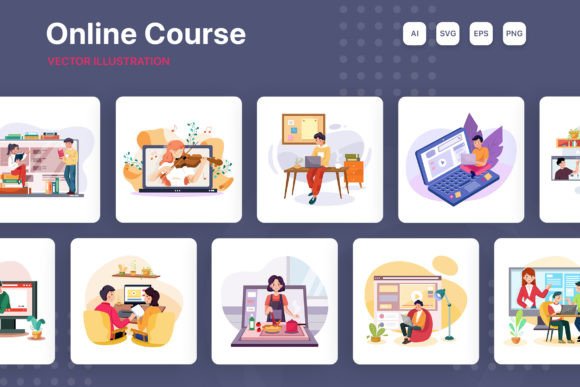
M206 Online Course Illustrations: Versatile Design Assets
When you are building a website, developing a mobile application, or finalizing a presentation for a major pitch, the gap between "good" and "great" often comes down to the visual assets you use. Stock photos can feel generic, and hiring a custom illustrator for every single project is rarely in the budget. This is where the M206 Online Course Illustrations collection steps in. It is not just a set of images; it is a comprehensive toolkit designed to bridge the gap between professional aesthetics and practical utility for designers, entrepreneurs, and content creators.
Understanding the Visual Style and Appeal
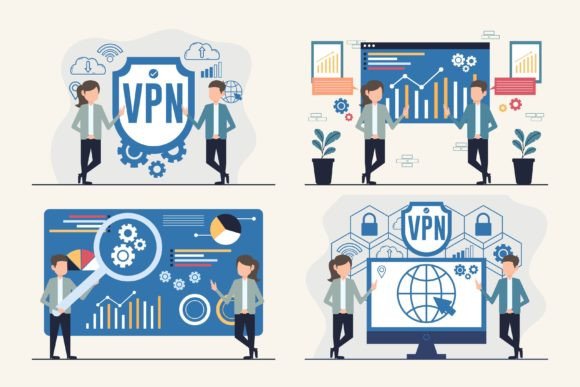
The defining characteristic of the M206 Online Course Illustrations is its commitment to a flat design style. In the current landscape of modern typography and web design, flat design has become the gold standard for user interfaces (UI) because it removes unnecessary clutter. These illustrations avoid heavy gradients or complex 3D rendering, focusing instead on clean lines, distinct shapes, and a harmonious color palette. This style feels inherently professional and trustworthy, which is crucial when you are trying to establish authority in fields like education, SaaS (Software as a Service), or corporate training.
What makes this collection particularly appealing is its personality. It strikes a balance between being playful enough to keep the viewer engaged and serious enough to convey credibility. Whether you are a marketer creating landing pages or a blogger trying to break up long-form text, these visuals add a layer of polish that text alone cannot achieve. The illustrations are designed to be universal yet specific enough to tell a story, making them a perfect fit for brand identity projects where consistency is key.
Practical Applications for Digital Projects
The versatility of the M206 Online Course Illustrations is one of its strongest selling points. Because the files are delivered in multiple formats—including AI, EPS, JPG, PNG, and SVG—you are not locked into a single workflow. For web design, the SVG (Scalable Vector Graphics) files are invaluable. They allow you to resize images to fit everything from a mobile screen to a 4K monitor without losing a single pixel of quality. This ensures your site looks crisp and professional on any device.
If you are a small business owner or an entrepreneur building a presentation, the JPG and PNG files (at a massive 4680×3120 px resolution) provide high-fidelity images that look stunning on projectors and high-definition screens. Meanwhile, graphic designers and crafters will appreciate the vector capabilities of the AI and EPS files. These formats allow for deep customization—you can easily edit paths, change colors to match a specific brand identity, or combine different elements to create a unique composition.
Consider the header section of a website. This is prime real estate that determines a visitor's first impression. Using a generic stock photo here can signal a lack of effort. Instead, using a customized illustration from the M206 set signals that you value design and user experience. It works exceptionally well for:
- Hero Sections: Creating an immediate visual hook.
- Feature Lists: Visualizing abstract concepts like "security" or "collaboration."
- Empty States: Making error pages or empty dashboards feel less sterile.
- Social Media Graphics: Ensuring your feed looks curated and consistent.
Customization and Integration
One of the most common frustrations with design assets is the inability to edit them. The M206 Online Course Illustrations solve this by being 100% vector. This means you have total control. If your client’s brand guidelines require a specific shade of blue, you can select the shapes in Adobe Illustrator and change them in seconds. This level of editability is essential for maintaining visual hierarchy and consistency across different platforms.
Furthermore, these illustrations are designed to play well with others. When it comes to font pairing, the clean nature of these graphics allows them to sit comfortably alongside various typefaces. Whether you are using a bold display font for your headers, a clean sans serif font for body copy, or even a stylized script font for accents, the illustrations provide a solid visual foundation without competing for attention. This is vital for readability; you want your text to be legible and your images to support the message, not distract from it.
For those working in editorial design or packaging design, the ability to isolate elements is a game-changer. You might only need a specific icon or a character from the set. With the provided vector files, you can deconstruct the illustration and use just the parts you need. This makes the asset pack incredibly efficient, effectively giving you hundreds of individual design elements rather than just ten static images.
Making the Right Choice for Your Brand
Choosing the right assets for a project involves more than just picking something that looks nice. It requires a strategic assessment of how the asset fits into the broader design ecosystem. When evaluating the M206 Online Course Illustrations, consider the tone of your project. Because the style is modern and flat, it pairs best with contemporary layouts and clean typography. If you are working on a vintage or rustic project, you might need to modify the colors significantly to make them fit.
However, for the vast majority of digital needs—from mobile applications to online course platforms—this style is ideal. It communicates efficiency and modernity. For content creators and marketers, using these illustrations can help increase engagement. Visuals break up text and make complex information easier to digest. By using high-quality, professional illustrations, you subconsciously elevate the perceived value of your product or service.
Ultimately, the M206 Online Course Illustrations are more than just decorative elements. They are functional design assets that solve real-world problems. They offer the scalability of vector graphics, the accessibility of standard image formats, and the professional polish of a curated design system. Whether you are a freelancer looking to speed up your workflow or a business owner aiming to professionalize your digital presence, this collection provides the tools you need to create compelling, cohesive, and high-performing visual content.